


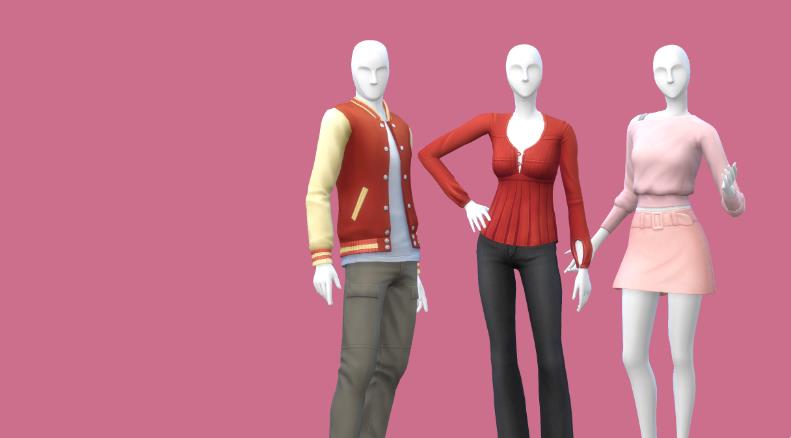

MOD เพื่อการจัดการโลกแฟชั่นของซิมส์ เปลี่ยนชุดเสื้อผ้าในโลกของ NPC และเซ็คค่าใหม่ให้ตรงใจคุณ
Uniforms และ Closet Threads
เคยไหม? ที่ต้องกุมขมับกับแฟชั่นสุดประหลาดของเหล่า “ชาวเมือง” (Townies) ที่สุ่มแต่งตัวกันจนน่าเวียนหัว ถึงเวลาแล้วที่คุณจะยึดอำนาจการแต่งตัวคืนมา! ด้วยระบบจัดการชุดยูนิฟอร์มและเสื้อผ้าที่จะเปลี่ยนให้ทุกย่านในเกมของคุณดูดีและมีระเบียบตามที่คุณต้องการ
1. สร้าง “ชุดยูนิฟอร์ม” กำหนดสไตล์ทุกย่าน
คุณสามารถควบคุมการแต่งกายของซิมส์ทุกคนในละแวกบ้านได้โดยการตั้งค่าชุดยูนิฟอร์ม (Uniforms) โดยสามารถระบุรายละเอียดได้ดังนี้:
- โครงสร้างร่างกาย (Body Frame): แยกตามช่วงวัยและขนาด (ผู้ใหญ่/เด็ก)
- สไตล์ที่ชอบ (Fashion Preference): เลือกว่าจะเป็นสไตล์ Masculine (ชาย) หรือ Feminine (หญิง)
- เงื่อนไขเฉพาะ: จำกัดการแต่งกายตามอาชีพ (Careers), งานเฉพาะกิจ (Situation Jobs เช่น บาร์เทนเดอร์, คนที่เดินผ่านไปมา, นักเรียน) หรือจะเลือกจำกัดเฉพาะ พื้นที่ (Regions) ที่กำหนดก็ได้
2. Closet Threads: จัดการตู้เสื้อผ้าให้ลึกกว่าที่เคย
นอกเหนือจากชุดที่แต่งในโหมดสร้างซิมส์ (CAS) ระบบ Closet Threads จะช่วยให้คุณดูแลตู้เสื้อผ้าของซิมส์ได้ละเอียดขึ้น โดยชุดเหล่านี้จะเข้ามาแทนที่การเปลี่ยนชุดในระหว่างวันของซิมส์โดยอัตโนมัติ แต่จำไว้ว่า ชุดยูนิฟอร์ม (Uniforms) จะมีความสำคัญสูงสุดและถูกเลือกใช้งานก่อนเสมอ
3. รายละเอียดการใช้งานที่ควรทราบ
- การเก็บข้อมูล: ข้อมูลชุดทั้งหมดจะถูกเก็บไว้ในโฟลเดอร์ lot51_fashion_authority_data ซึ่งจะอยู่ข้างๆ ไฟล์ .ts4script ของคุณ ข้อมูลจะเซฟอัตโนมัติพร้อมกับเกมของคุณ (อย่าลืมสำรองโฟลเดอร์นี้ไว้เสมอเวลาอัปเดตมอด)
- ความหลากหลาย: คุณสามารถสร้างชุดหลายๆ แบบภายใต้เงื่อนไขเดียวกันได้ ระบบจะทำการสุ่มเลือกชุดออกมาใช้งานเพื่อให้ดูไม่ซ้ำซาก
- ข้อยกเว้น: หากซิมส์ต้องเปลี่ยนเป็น ชุดออกกำลังกาย (Athletic), ชุดว่ายน้ำ (Bathing) หรือชุดนอน (Sleepwear) ระบบจะหยุดใช้ชุดยูนิฟอร์มชั่วคราวจนกว่าซิมส์จะเปลี่ยนกลับเป็นชุดปกติ
- Queue Mode: โดยปกติเมื่อมีการสั่งเปลี่ยนชุด ระบบจะเพิ่มคำสั่งเข้าในคิว (Queue) ของซิมส์ แต่คุณสามารถตั้งค่าให้เปลี่ยนทันทีได้ในเมนู Setting
4. ข้อจำกัดสำหรับซิมส์เหนือธรรมชาติ (Occults)
- เงือก (Mermaids): ณ ปัจจุบัน (เวอร์ชัน 1.2.1 เป็นต้นไป) ระบบ Threads ยังไม่รองรับร่างเงือก และจะถูกยกเว้นจากการบังคับใช้ชุดยูนิฟอร์ม
⚠️ คำเตือนสำคัญสำหรับการใช้ CC (Custom Content)
หากคุณกำลังทำการทดสอบมอด (50/50 test) หรือลบไฟล์ CC ออกจากเครื่อง ต้องทำการสำรองโฟลเดอร์ lot51_fashion_authority_data ไว้ก่อนเสมอ เนื่องจากหากไฟล์ CC ที่ถูกใช้ในยูนิฟอร์มหายไป อาจทำให้ข้อมูลชุดเสียหาย และส่งผลให้ซิมส์ของคุณ “เปลือยกาย” ปรากฏตัวในที่สาธารณะได้!
Been burned too many times by townie fashion? Take control of the threads around your hoods by instituting uniforms! Assign outfits based on Body Frame (Adult/Child), and Fashion Preference (Masculine/Feminine) then restrict by Situation Jobs or Careers, and limit to specific Regions.
Once a Sim has a uniform assigned, anytime they spawn to be assigned to a job (bartender, walkby, student, etc) or a career during work hours, they’ll automatically have their outfit overwritten by your uniform!
Closet Threads allow you to curate a Sim’s closet beyond their CAS outfits and automatically override their outfit changes when they move about their day. Uniforms will always take precedence.
Please Note
General Usage
- Threads are stored per Save Game Slot in the lot51_fashion_authority_data directory located next to the ts4script. They will automatically save when your game is saved. Be sure to keep this folder between updates in the same folder as the ts4script.
- You can create multiple Threads with the same restrictions, and a random Thread will be selected from all available matches. You may also add multiple outfit slots within CAS which will be randomly chosen from once a Thread is selected.
- If Sims request an Athletic, Bathing, or Sleepwear outfit, their Uniform will be ignored until they change back.
- Queue Mode, enabled by default, will add “Change into Threads” actions to the Sim’s queue, you can revert to the original immediate mode by toggling Queue Mode in the settings menu. This doesn’t affect Sims changing into outfits automatically. Changing into an outfit while using “Manage Threads” will always apply immediately.
- Mannequins do not have a nail category but you can find nails by selecting the main Accessories category in CAS.
Occults
- Mermaid Form outfits are unsupported with Threads and are excluded from uniform enforcement as of v1.2.1.
Warning
If you are performing a 50/50 mod test or removing CC for any reason, please be sure to backup your lot51_fashion_authority_data folder. Removing CC that was included in a uniform could corrupt the Thread and cause your Sims to show up nude in inappropriate situations.
Download
- จำเป็นต้องลง Core Library
- ต้องมีภาคเสริม High School Years