


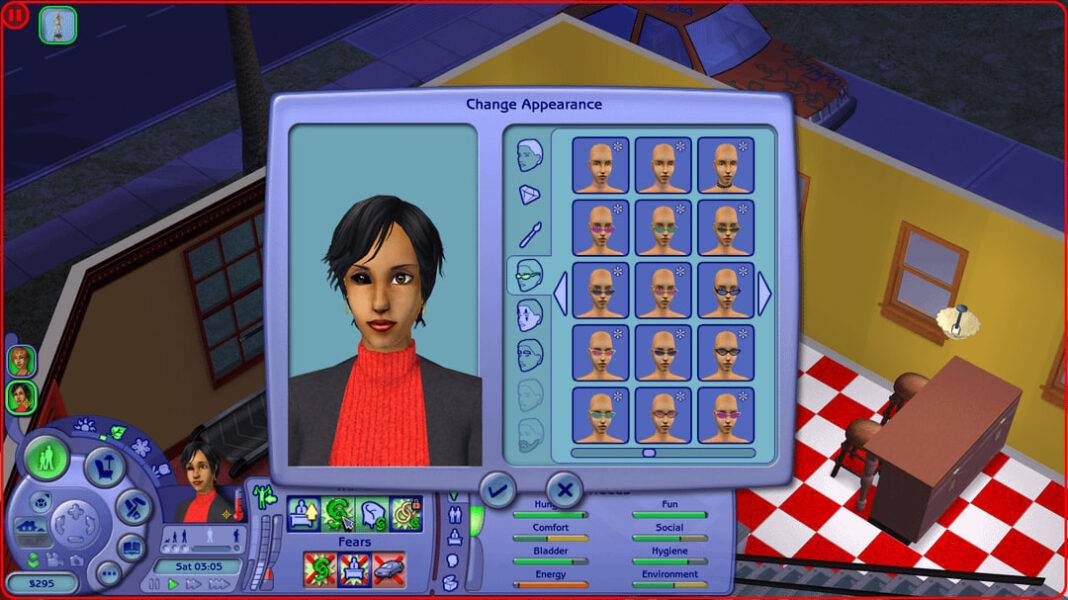

sims2-4k-ui-patch เป็นเครื่องมือที่ช่วยขยาย UI ของเกม The Sims 2 ให้ใหญ่ขึ้นสำหรับจอความละเอียดสูง (2K / 4K) เพราะตัวเกมถูกสร้างขึ้นในยุคที่ยังไม่มีจอ HiDPI — เลยทำให้เวลารันเกมที่ความละเอียดสูง ปุ่ม ตัวหนังสือ UI ต่าง ๆ เล็กจิ๋วมองแทบไม่เห็น
โปรเจกต์นี้แก้โดยการแพตช์ไฟล์ UI ของเกมโดยตรง — ขยายขนาดเรขาคณิต กราฟิก และฟอนต์ของ UI เป็น 2 เท่า (หรือ 150% ในโหมดทดลอง)
✅ ใช้ได้จริงไหม?
ได้! รองรับ The Sims 2 ทุกเวอร์ชันยกเว้น Legacy Collection (2025) เพราะตัวนั้นมีระบบ scale UI ในตัวอยู่แล้ว (แต่ภาพจะเบลอ)
⚠️ ข้อควรรู้
🟢 รองรับ
• รายละเอียด: แบบแผ่น กล่องแท้ และ Ultimate Collection (Origin) ตัวเดิม
🔴 ไม่รองรับ
• รายละเอียด: Legacy Collection (2025) — UI scale ซ้อนกัน สามารถปรับด้วยคำสั่งเองได้
🟡 ข้อบกพร่อง
• รายละเอียด: Pie Menu เล็กเมื่อมีตัวเลือกเยอะ, artifacts ตอน 150%
🚀 จุดเด่น
– 🐍 Pure Python — อ่าน/เขียนไฟล์ DBPF (ไฟล์ .package ของเกม)
– 📦 CLI ใช้คำสั่งเดียว: sims2-4k-ui-patch
– 🔧 ปรับแต่งได้ — ควบคุมผ่าน Graphics Rules.sgr
– 📂 ไฟล์เกมไม่เสียหาย — แพตช์เฉพาะ UI resources
📦 วิธีติดตั้งสำหรับ PC (อย่างย่อ)
📦 วิธีติดตั้งสำหรับ MAC OS (อย่างย่อ)
# ติดตั้ง
pip install sims2-4k-ui-patch

# รัน — ตัวโปรแกรมจะถามหาโฟลเดอร์เกม
sims2-4k-ui-patch
เหมาะสำหรับ: แฟน The Sims 2 ที่อยากเล่นบนจอ 4K โดย UI เล็กเกินไปจากการไม่สามารถปรับขนาดด้วยคำสั่งในเกมได้
โปรแกรม 4K UI Patcher โดย Lah7 สุดยอดมาก ๆ มันแก้ปัญหาใหญ่ข้อสุดท้ายของเกมนี้บนฮาร์ดแวร์สมัยใหม่ได้ นั่นก็คือ UI เล็กเกินไปจนมองเห็นอะไรไม่ชัดบนจอภาพความละเอียดสูง มีการแก้ไขบั๊กครั้งใหญ่เมื่อไม่กี่วันก่อน และตอนนี้ใช้งานได้ดีจริง ๆ แล้ว

ในภาพ ภาพแรกคือหลังจากติดตั้งแพทช์แล้ว ภาพที่สองคือก่อนติดตั้งเพื่อเปรียบเทียบ แตกต่างกันมาก! และคุณจะเห็นว่าแคตตาล็อกและหน้าจออื่น ๆ ใช้งานง่ายขึ้นมาก
ในที่สุด ผมก็ไม่ต้องหรี่ตาและโน้มตัวเข้าไปดูอะไรอีกแล้ว! มันสุดยอดมาก ทำให้ผมรู้สึกคิดถึงวันเก่า ๆ เหมือนตอนที่เล่นเกมนี้บนจอ CRT เครื่องเก่าตอนที่มันวางจำหน่ายใหม่ ๆ


Download
โปรแกรมยังไม่รองรับ
- The Sims™ 2: Super Collection (ตัวเก่าของ MAC OS)
- The Sims™ 2 Legacy Collection ใช้วิธีการปรับตามขั้นตอนดังนี้
Bigger UI in Sims 2 Legacy (tutorial)
Hi! I’ve seen many people posting about the problem of the UI being too small in the Legacy Collection, since it now launches in borderless window and automatically adjusts to your screen resolution. There is a program called Magpie that can stretch your game from a smaller window to full screen, and I will tell you how to use it. Video tutorial here.
Edit: This is for 1920×1080 resolution! Will work on higher res too, but for that EA has their own fix. Go to your installation files → EP9\TSData\Res\Config and open the Graphics Rules file. Search for “uintProp uiScaleFactor” and change the number to 3 to get large scaling (there are text instructions inside).
ขั้นตอน:
- Download Magpie (I chose the second option on the list; of course then unzip it to get a folder)
- Launch your game, do Alt+Enter to go to windowed mode and change the resolution to a smaller one (preferably the same aspect ratio as your screen, so 1600×900 or 1280×720)
- Launch Magpie from the folder (the feather icon)
- In Magpie, go to “New Profile” and choose Sims 2 Legacy from the list
- In Scaling Mode for the game’s profile, choose FSR (FidelityFX Super Resolution is what it means apparently) and turn on “Disable screen resizing while scaled” (you can play with the settings and check what works best for you)
- In Home/Scale, set up a key shortcut that changes the game from windowed to upscaled by Magpie (I went for Alt+F)
- In-game AND in windowed mode, run the shortcut
- Your game should be now upscaled with a bigger UI (and you can still change the resolution in settings!)
Unfortunately, this disables edge scrolling because you’re technically still in windowed mode. It’s not perfect, but it’s something!
The photo shows upscaled 1280×720 in neighborhood view (the double cursor thing only happens in capture and Magpie has settings for that too).
Hope this helps!
Download
หรือปรับคำสั่งเพิ่ม
The UI scale factor is configurable in this file:
The Sims 2 Legacy Collection\EP9\TSData\Res\Config\Graphics Rules.sgr
There is a line determining the scale. However, 1 is still too large.
uintProp uiScaleFactor 1