


ย้อนหน้าเมนูไปสมัยเกมออกเมือปี 2017 และยังเติมโลโก้ไอคอนของภาคใหม่ๆ รอบรับ ถึงภาค Royalty & Legacy
V3.1 is a hotfix and pack prep update for the upcoming pack.
V3.1 Changes
- Fixed visual glitches from 2/3/26 Patch
- Added compatibility for upcoming Royalty and Legacy pack & world.
V3.0 Changes
- Added Lot Alignment calculations for individual and group move.
- Use Lot Alignment added as a toggle to Move Dialog
- TOOL now blocks the Full Screen ads that appear on the main menu, due to an intermittent EA bug with an immovable gray screen that was often incorrectly blamed on TOOL.
The numerical move has always been difficult to use on lots that aren’t aligned to the world axis, because TOOL used the world axis for movement.
Lot Alignment is finally an option, and can be toggled on similarly to how you can toggle Rotate Around Center on the Rotate dialog. It will stay on for the session or until you turn it off.
When you open the Move dialog, you’ll see a “Use Lot Alignment” button at the bottom. Clicking that will change the movement grid to match the lot’s orientation.
Thanks everyone, I hope you enjoy.
===Previous Updates===
TOOL v2.8 comes with a draggable dialog window! Just click on the TOOL dialog title and drag it to where you’d like the dialog to be. This setting will automatically load when starting a new game session.
Thanks everyone!
2.9.2 UPDATE:
- Fixed UI visual glitches with 9/16/25 patch
- Prepped for compatibility Adventure Awaits world and pack.
- Fixed Pack Selection UI not displaying
2.8.10 UPDATE:
- Tracked down and fixed Escape issue, where dialogs would get “hidden” in queue and reappear when saving the game.
- Fixed borders of dialogs lacking rounded edges.
2.8.9 UPDATE:
- Updated compatibility for Businesses & Hobbies
Thank you to those who were patient. To those who were not, start.
2.8.7 UPDATE:
- Added in-game detection & notice for conflicting UI mods (Typically UI Recolors)
- Fixed off-lot objects disappearing on rental or apartment properties.
- Fixed dragging functionality for TOOL dialogs.
- Added compatibility with Life & Death world
2.8.3 UPDATE:
- Adds compatibility for the Reaper Rewards Event.
2.7.2 UPDATE:
- Please re-update to 2.7.2 to fix any remaining issues with TOOL’s menu not showing in Better BuildBuy.
2.7.1 UPDATE:
- Implemented temporary patch for EA scripted dialog issues.
- Added necessary data for For Rent Pack and world.
2.7 UPDATE:
- TOOL now has a Stay Open option in settings that will repeat the last command until the user click cancel.
- By feedback patrons’ decision, the stay open option is on by default. If you prefer not to use this option, please be sure to turn it off in settings when installing a fresh copy of TOOL.
- Fixed a specific scenario where the move grid does not disappear, triggered by deactivating all objects before clicking OK to the move prompt.
2.6.4 UPDATE:
- Fixed a bug that could cause the group selection box to not reappear after hiding it while the circle was not closed.
- Fixed a bug that could compound an EA gallery bug and cause a LUIE.
2.6.3 UPDATE:
- Fixed graphical issues with the 10-11-22 game patch.
- Added compatibility for the new EA tutorial dialogs.
2.6 UPDATE:
- TOOL now tells players when their script mods aren’t turned on.
- Added compatibility for the Moonwood Mill world that came with Werewolves.
2.5 UPDATES:
- TOOL will now notify you in-game when an update is available. This should help reduce the amount of people clinging to year old versions of TOOL.
- Due to a game bug introduced by EA several patches ago, off-lot objects were disappearing any time players loaded an apartment/dorm style lot. I’ve implemented a workaround for this.
- Reduced the radius for closing the grouping box, as TOOL users are usually working in a smaller space than Create-A-World testers. This means you’ll be able to click closer to the original point before it will snap close.
2.4 UPDATES:
- The grouping box now supports any polygonal shape.
- The grouping box visualizer follows terrain
- The grouping box can now select multiple levels.
====Original Post====
Want TOOL in build mode? Grab Better BuildBuy as well!
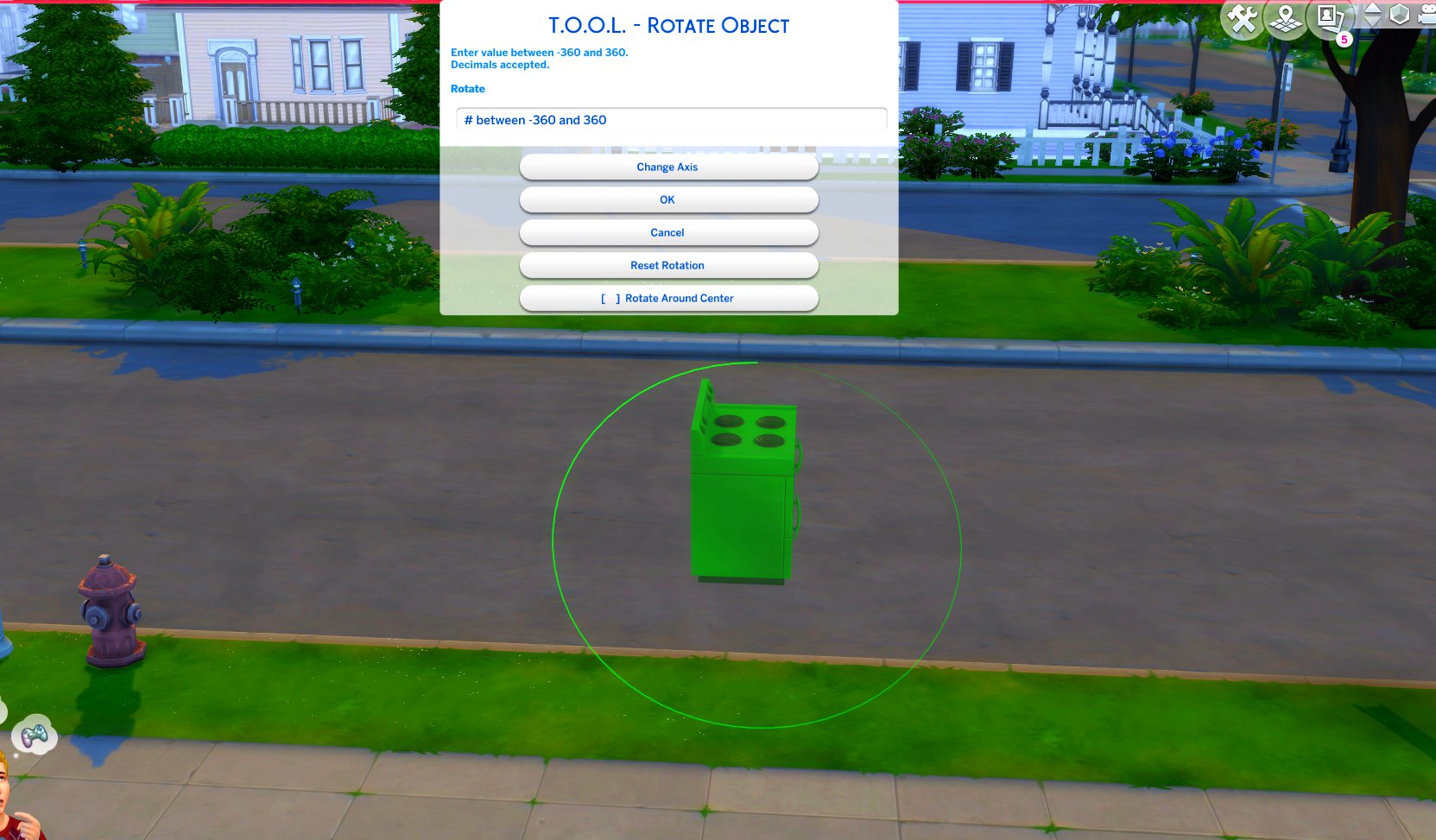
TOOL v2.3 brings a new feature called Rotate Around Center. It’s a toggle in the rotate dialog that lets you choose whether group rotation will rotate all objects around their own axis, or around the group’s center.
This video demonstrates the difference.
Many players requested this, as it’ll allow them to rotate TOOL-only builds after they’ve finished, instead of having to plan which rotation they want to begin with. I hope everyone enjoys.
- Rotation Around Center added to Rotate Dialog
- Added an improved rotation indicator. The circle is now a gradient.
Dim = 0. Bright = 360.
Positive rotation amounts will always move dim -> bright.
❓❔❓ HOW TO USE ❓❔❓
TOOL Build Mode Quick-Start
- Better BuildBuy must also be installed.
- The usage is the same as regular TOOL, except you will automatically be placed in TOOL mode any time the TOOL dialog is open.
- Toggle TOOL in build mode by pressing Shift+T
- In addition, shift+clicking surfaces will automatically place a group box marker. This can be used in combination with the Toggle Group button to highlight many objects at once.
- When the TOOL extension is open, ctrl+z and ctrl+y will handle the TOOL undo/redo instead of the buildbuy undo/redo. Buildbuy undo still works when TOOL is closed.
- If you’re new to TOOL entirely, refer to my original tutorial.
TOOL Live Mode Quick-Start
- No other mods are required.
- Need to enter testingcheats true or you can optionally force it always on using my AlwaysTesting mod.
- Shift+click objects for TOOL menu
- Shift+click surfaces for TOOL options menus.
- If you’re new to TOOL entirely, refer to my original tutorial.
Install Instructions
⚠ FOLLOW IT WORD FOR WORD. ⚠
1. Delete any existing copies you have for TOOL.
2. DON’T use any zip extract options. Instead, OPEN the “TwistedMexi’s TOOL v3.1 official” zip by clicking it and drag the “Tmex-TOOL” folder inside to your mods root. That’s it!
Do NOT restructure or modify the files in any way.
3. Make sure 👉Script👈 Mods are enabled in gameplay options -> “Other”. Restart if it wasn’t.