


Seasons Master Fix: ม็อตปรับฤดูกาลให้โลก The Sims 4 ของคุณอย่างเต็มรูปแบบ
สำหรับแฟนเกม The Sims 4 ที่ติดตั้งภาคเสริม Seasons คงจะเคยรู้สึกเสียดายที่บางโลกในเกมไม่ได้ถูกออกแบบมาให้รองรับทั้ง 4 ฤดูกาลอย่างเต็มที่ เช่น โลกอย่าง Ravenwood ที่ตกอยู่ในฤดูใบไม้ร่วงตลอดกาล แต่กลับมีต้นไม้สีส้มอยู่เพียงไม่กี่ต้น ทำให้บรรยากาศดูไม่สมจริงเท่าที่ควร แต่วันนี้ ปัญหาเหล่านั้นจะหมดไป ด้วยม็อดที่มีชื่อว่า Seasons Master Fix (WIP) ที่จะมาแก้ไขและปรับปรุงให้โลกต่างๆ ใน The Sims 4 สามารถแสดงผลของฤดูกาลได้อย่างสวยงามและสอดคล้องกันมากขึ้น
ม็อดนี้เป็นผลงานที่ยังอยู่ในระหว่างการพัฒนา (Work in Progress) โดยมีเป้าหมายหลักเพื่อแก้ไขเนื้อหาที่ขาดความเข้ากันได้กับภาคเสริม Seasons[1] จุดประสงค์ของม็อดไม่ได้เน้นความสมจริงเป็นหลัก แต่เน้นที่ความสอดคล้องของบรรยากาศ และให้อิสระแก่ผู้เล่นในการปรับแต่งโลกได้ตามใจชอบ เหมือนกับในเกม The Sims 2 และ The Sims 3 ที่เราสามารถสร้างฤดูหนาวในโลกเขตร้อนได้เพื่อความสนุกสนาน[1]
คุณสมบัติเด่นของ Seasons Master Fix
นอกจากการแก้ไขให้พืชพรรณและสภาพแวดล้อมเปลี่ยนแปลงไปตามฤดูกาลแล้ว ม็อดนี้ยังมีการแก้ไขจุดบกพร่องอื่นๆ อีกมากมาย เพื่อยกระดับประสบการณ์การเล่นของคุณให้ดียิ่งขึ้น[1] ได้แก่:
- แก้ไขเงาที่หายไป: แก้ไขปัญหาเงาของเปลือกหอยที่หายไปในโลก Ciudad Enamorada[1]
- แก้ไขตำแหน่งสะพาน: ปรับตำแหน่งของสะพานในโลก Ravenwood ที่วางผิดที่[1]
- ปรับปรุงพื้นผิวหิมะ: แก้ไขกองดินและจุดขุดหาของที่ไม่แสดงผลเป็นหิมะเมื่อถึงฤดูหนาว[1]
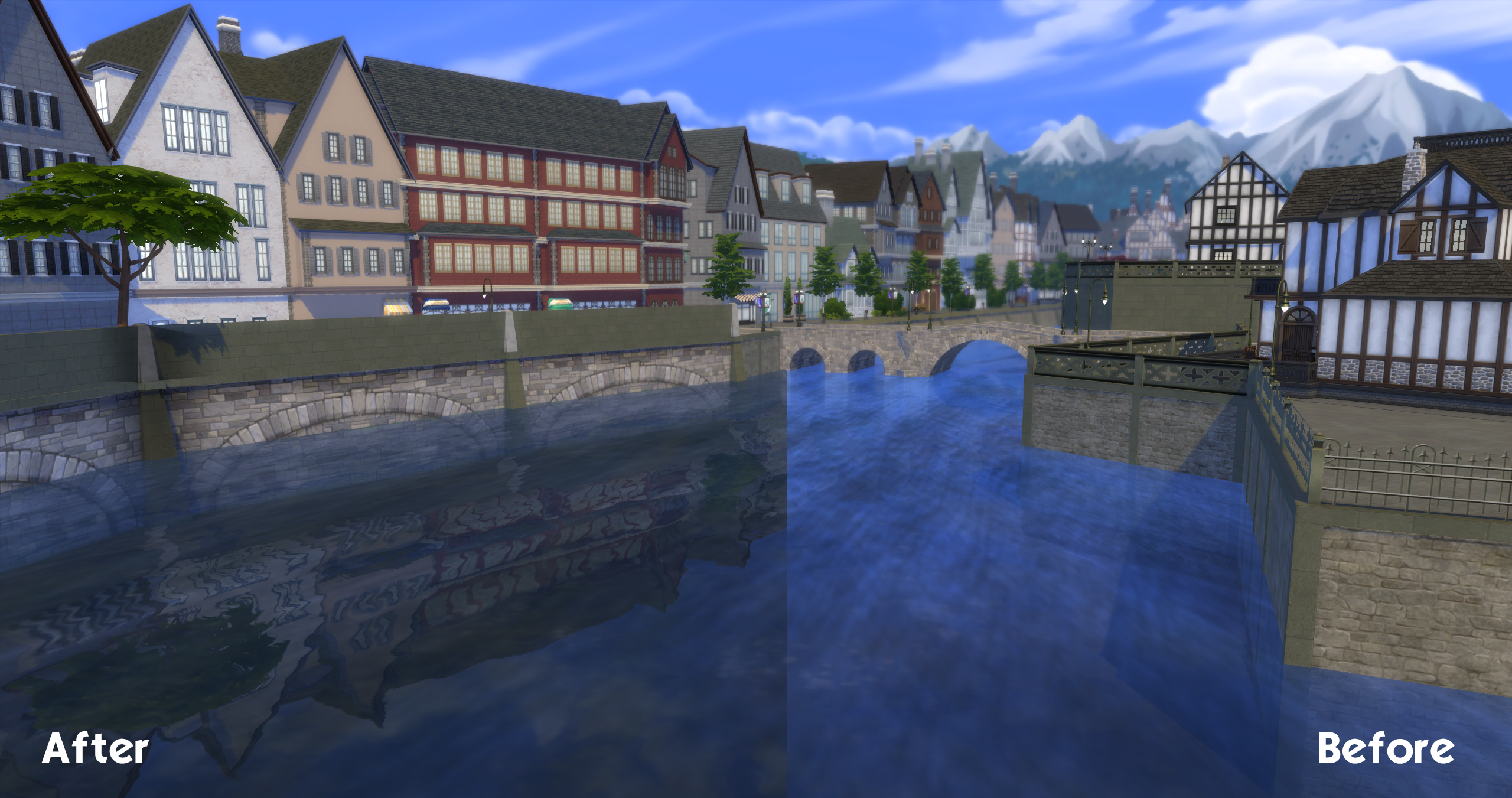
- ปรับปรุง Water Shader: แก้ไขเฉดสีของน้ำในหลายๆ โลกให้มีความแวววาวและสะท้อนแสงได้สมจริงยิ่งขึ้น รวมถึงรองรับการจับตัวเป็นน้ำแข็งในฤดูหนาว[1]
โลกที่ได้รับการปรับปรุงแล้ว
ม็อดนี้ได้ทำการปรับปรุงโลกต่างๆ ไปแล้วหลายแห่ง และนี่คือรายชื่อของโลกที่ได้รับการแก้ไขจนเกือบสมบูรณ์[1]:
- Innisgreen: เกือบสมบูรณ์ (ยกเว้นบางส่วนในเขต Everdew ที่หิมะไม่ตก หากไม่ใช้ไฟล์ Tuning เสริม)
- Nordhaven: แก้ไขปัญหาหิมะที่เป็นพิกเซลแตก
- Ravenwood: แก้ไขเนื้อหาจำนวนมาก เกือบจะสมบูรณ์แล้ว
- Ciudad Enamorada: เสร็จสมบูรณ์
- Chestnut Ridge: ลบเอฟเฟกต์รุ้งและหมอกที่ไม่สวยงามในเขตแคนยอน และอัปเดตเฉดสีของน้ำ
- San Sequoia: เกือบสมบูรณ์
- Copperdale: แก้ไขพื้นผิวในฤดูหนาวที่ทำออกมาได้ไม่ดี
- Evergreen Harbor: แก้ไขปัญหาน้ำไม่จับตัวเป็นน้ำแข็ง และปรับปรุงเฉดสีของน้ำ
- Brindleton Bay: แก้ไขต้นไม้
- San Myshuno: ปรับปรุงเฉดสีของน้ำและเมฆ
- Windenburg: ปรับปรุงเฉดสีของน้ำในเขตเมืองเก่า
- BG (Base Game): แก้ไขเนื้อหาพื้นฐานบางส่วน
ตัวอย่างโลกและพื้นผืวทีแสดง


วิธีการติดตั้ง
ภายในไฟล์ม็อดที่ดาวน์โหลดมาจะประกอบไปด้วย 3 โฟลเดอร์หลัก[1] ผู้เล่นจำเป็นต้องนำไฟล์ไปวางในโฟลเดอร์ Mods ของเกม The Sims 4 ตามที่ระบุไว้ ซึ่งโดยทั่วไปแล้ว โฟลเดอร์ Mods จะอยู่ที่ Documents\Electronic Arts\The Sims 4\Mods
ความเข้ากันได้กับม็อดอื่น
สิ่งสำคัญที่ผู้เล่นต้องทราบคือ Seasons Master Fix ไม่สามารถใช้งานร่วมกับม็อดที่ปรับแต่งแสงในโลก (Lighting Overrides) ได้ เนื่องจากไฟล์ของโลก (World files) ไม่ได้มีแค่การตั้งค่าแสงเพียงอย่างเดียว[1]
สำหรับไฟล์ในโฟลเดอร์ Tuning สามารถถูกแทนที่ด้วยม็อดอื่นที่แก้ไขสภาพอากาศโดยตรงได้ (เช่น ม็อด Seasons Weather Overhaul)[1]
ข้อควรระวัง
เนื่องจากม็อดนี้ยังอยู่ในระหว่างการพัฒนา (WIP) ผู้เล่นอาจพบเจอปัญหาหรือบั๊กต่างๆ ได้[1] มีรายงานจากผู้ใช้บางรายว่าพบปัญหาเกมแครชขณะเซฟหลังจากติดตั้งม็อด ซึ่งผู้สร้างม็อดได้ชี้แจงว่าอาจเกี่ยวข้องกับปัญหาของตัวเกมเองหลังจากการอัปเดตแพตช์ล่าสุด[2] ดังนั้นจึงขอแนะนำให้ผู้เล่นสำรองไฟล์เซฟเกมทุกครั้งก่อนทำการติดตั้งม็อดใหม่ๆ
ABOUT
Three folders. World file overrides, tuning files that go to your mods folder and assets folder that also goes to mod folder.
The aim of this master post is to fix seasons compatibility-lacking assets. How many times do you look at Ravenwood and think wow this eternal fall really doesn’t hold up with just 6 orange trees in one of the three entire districts so would’ve been nicer if it had the full 4 seasons… Welp! Here’s a solution to that.
The aim isn’t for realism, it’s for consistency and to bring back that Sims 3/Sims 2 customization era where you could have winter in tropical worlds just because it’s fun.
This isn’t just seasonal fixes, there’s also fixes for missing shell shadows in Ciudad Enamorada, the misplaced bridge in Ravenwood, dig spots having no snow, dirt piles having no snow, various water shader fixes to be more reflective/compatible with ice formation. It’s a lot of work done, although not complete, but in a state where it’s usable without noticing issues.
Worlds essentially done:
- Innisgreen (Fully done minus some assets in the Everdew district as that area doesn’t snow in, unless you use the Tuning files for it)
- Nordhaven (Fixes for the pixelated snow)
- Ravenwood (Tons of overridden assets, basically complete besides one or two 2D backgrounds)
- Ciudad Enamorada (Fully done)
- Chestnut Ridge (Removes that ugly rainbow/fog in that canyon district/updates water shaders)
- San Sequoia (Complete besides some 2D backgrounds)
- Copperdale (Overrides assets as the texturing is awful there for winter)
- Evergreen Harbor (Fixes ice not forming on water, some water shader fixes, fixes that invisible T junction of the yellow bridges)
- Brindleton Bay (A tree fix)
- San Myshuno (water shader fixes, fix for that nasty pollution in the water that looks awfully done + cloud adjustment as there’s an annoying seam)
- Windenburg (one shader adjustment in the old town district for the water, makes that stretched texture more bearable with glossy reflections :D)
- BG (various assets, nothing yet for Oasis, more work will need to be done for that one later)
Shouldn’t require updates other than for the Tuning folder files, which had needed updating once for Life & Death.
COMPATIBILITY
Not compatible with any lighting overrides for worlds, as world files contain more than just lighting settings, sadly :/
Tuning CAN be replaced with other mods that edit weather itself (like the seasons weather overhaul mods)